
Digital Marketing Course (Professional – 4-5 Months)



Course Name: Professional Digital Marketing Course
Duration: 4-5 Months (20 Weeks)
Classes: 5 Days per Week
Class Time: 1.5 – 2 Hours Daily
Level: Beginner to Professional
Fee: Rs. 30,000
🎯 Course Objective:
To teach students how to promote businesses online, manage social media, run ads, and build digital marketing strategies for jobs, freelancing, or starting their own online business.
Course Structure
Module 1: Introduction to Digital Marketing (Week 1)
Topics
- What is digital marketing
- Types of digital marketing
- Digital marketing channels
- Online business models
- Marketing strategy basics
Practical
- Analyze popular brand campaigns
- Create basic marketing plan
Module 2: Website & Blogging Basics (Week 2–3)
Topics
- Introduction to websites
- Domain and hosting
- Blog creation
- Website structure
- Content management basics
Practical
- Create simple blog website
- Publish first blog post
Module 3: Search Engine Optimization (SEO) (Week 4–7)
Topics
- SEO fundamentals
- Keyword research
- On-page SEO
- Off-page SEO
- Technical SEO basics
- SEO tools
Practical
- Optimize blog content
- Perform keyword research
Module 4: Social Media Marketing (Week 8–10)
Topics
- Social media platforms
- Facebook marketing
- Instagram marketing
- LinkedIn marketing
- Social media strategy
- Content planning
Practical
- Create social media pages
- Design content calendar
Module 5: Content Marketing (Week 11–12)
Topics
- Content strategy
- Blog writing
- Visual content
- Storytelling in marketing
Practical
- Write marketing blog
- Create content plan
Module 6: Paid Advertising (Week 13–14)
Topics
- Online advertising basics
- Facebook ads
- Instagram ads
- Google ads basics
- Campaign management
Practical
- Create ad campaign
- Analyze ad performance
Module 7: Email Marketing (Week 15)
Topics
- Email marketing basics
- Building email list
- Email campaigns
- Email automation basics
Practical
- Create email campaign
Module 8: Analytics & Performance Tracking (Week 16)
Topics
- Website analytics
- Traffic analysis
- Marketing metrics
- Performance optimization
Practical
- Analyze website traffic
- Track campaign results
Module 9: Freelancing & Online Earning (Week 17-18)
Topics
- Freelancing platforms
- Client communication
- Building digital marketing portfolio
- Online project management
Practical
- Create freelancing profile
- Prepare portfolio
Module 10: Final Project & Certification (Week 19-20)
Students complete a real digital marketing project.
Example Project
- Create marketing strategy
- Optimize website SEO
- Run social media campaign
- Create ad campaign
Evaluation
- Practical exam
- Marketing campaign project
- Presentation
Tools Covered
Students will learn popular digital marketing tools such as:
- Google Analytics
- SEO tools
- Social media management tools
- Email marketing tools
Career Opportunities
After completing this course students can work as:
💼 Digital Marketing Executive
💼 Social Media Manager
💼 SEO Specialist
💼 Content Marketer
💼 Freelance Digital Marketer
2. Graphic Design Course (Professional – 2.5 Months)
Course Name: Professional Graphic Design Course
Duration: 2.5 Months (10 Weeks)
Classes: 5 Days per Week
Class Time: 1.5–2 Hours Daily
Level: Beginner to Professional
Fee: 20,000
🎯 Course Objective:
To teach students professional design skills used in advertising, social media, branding, and printing industries, and prepare them for jobs or freelance work.
Course Structure
Module 1: Introduction to Graphic Design (Week 1)
Topics
- What is graphic design
- Design principles (contrast, balance, alignment)
- Color theory
- Typography basics
- Understanding branding
- Types of graphic design (print, digital, advertising)
Practical
- Color palette creation
- Basic typography exercises
Module 2: Design Software Basics (Week 2)
Topics
- Introduction to design software
- Workspace and tools
- Layers and objects
- File formats (PNG, JPG, PDF, AI, PSD)
Practical
- Simple poster design
- Basic layout creation
Module 3: Image Editing & Photo Manipulation (Week 3)
Topics
- Photo editing techniques
- Image correction
- Background removal
- Photo retouching
- Photo manipulation
Practical
- Photo enhancement
- Background change
- Photo collage
Module 4: Vector Design & Logo Creation (Week 4)
Topics
- Vector graphics basics
- Logo design process
- Shapes and paths
- Icons and illustrations
- Branding identity
Practical
- Logo design project
- Business card design
- Icon creation
Module 5: Print Design (Week 5)
Topics
- Poster design
- Banner design
- Brochure design
- Flyer design
- Visiting card design
Practical
- Event poster
- Tri-fold brochure
- Business card
Module 6: Social Media Graphics (Week 6)
Topics
- Social media design trends
- Instagram post design
- Facebook banner
- YouTube thumbnails
- Advertising creatives
Practical
- Instagram posts
- Social media campaign design
Module 7: Branding & Marketing Design (Week 7)
Topics
- Brand identity design
- Packaging design
- Marketing graphics
- Advertisement design
Practical
- Brand kit creation
- Product packaging mockup
Module 8: Freelancing & Portfolio (Week 8-9)
Topics
- Building a design portfolio
- Freelancing platforms
- Client communication
- Pricing design work
Practical
- Portfolio creation
- Upload projects online
Module 9: Final Project & Exam (Week 10)
Students must complete a professional design project.
Example Project
- Logo design
- Business card
- Social media posts
- Poster design
- Brand identity kit
Evaluation
- Practical test
- Portfolio review
- Final project presentation
Software Covered
Students will learn industry tools such as:
- Adobe Photoshop
- Adobe Illustrator
- Canva
- Basic layout tools
Career Opportunities
After completing this course, students can work as:
💼 Graphic Designer
💼 Social Media Designer
💼 Branding Designer
💼 Advertising Designer
💼 Freelance Designer
3. Job-Oriented Computer Course (JOCC)
Course Name: Job-Oriented Computer Course
Duration: 6 Months (24 Weeks)
Classes: 5 Days per Week
Class Time: 1.5 – 2 Hours Daily
Level: Beginner to Professional
Fee: Rs. 30000
🎯 Course Objective:
To prepare students for office jobs, data entry work, accounts jobs, and online work by providing practical computer skills.
Course Modules
Module 1: Computer Fundamentals (Week 1)
Topics
- Introduction to computers
- Hardware and software
- Input and output devices
- Types of computers
- Basic troubleshooting
Practical
- Identify computer parts
- Basic system operations
Module 2: Windows Operating System (Week 2–3)
Topics
- Desktop and taskbar
- File and folder management
- Installing and removing software
- System settings
- Basic troubleshooting
Practical
- File organization
- Installing software
Module 3: Typing Skills (Week 4–5)
Topics
- Keyboard layout
- Typing techniques
- Speed and accuracy
- Shortcut keys
Practical
- Daily typing practice
- Speed test
🎯 Target: 30–40 WPM typing speed
Module 4: Microsoft Word (Week 6–7)
Topics
- Document creation
- Text formatting
- Tables and page layout
- Resume design
- Mail merge
- Printing documents
Practical
- Create resume
- Write official letter
- Create report
Module 5: Microsoft Excel (Week 8–10)
Topics
- Spreadsheet basics
- Data entry
- Formulas and functions
- IF function
- Charts and graphs
- Data sorting and filtering
- Basic data analysis
Practical
- Salary sheet
- Sales report
- Marks sheet
Module 6: Microsoft PowerPoint (Week 11)
Topics
- Creating presentations
- Slide design
- Animations
- Business presentations
Practical
- Create company presentation
Module 7: Internet & Online Work (Week 12–13)
Topics
- Internet basics
- Web browsing
- Google search skills
- Email creation and management
- Online forms
- File downloading and uploading
Practical
- Create email account
- Send attachments
Module 8: Digital Office Skills (Week 14–16)
Topics
- Google Docs
- Google Sheets
- Google Drive
- Online collaboration
- Cloud storage
- Office productivity tools
Practical
- Create shared documents
- Online spreadsheet
Module 9: Accounting with Tally & GST (Week 17–19)
Topics
- Accounting basics
- Company creation
- Ledger creation
- Voucher entries
- GST invoices
- Inventory management
Practical
- Record business transactions
- Create GST bills
Module 10: Basic Graphic Design (Week 20–21)
Topics
- Photo editing basics
- Poster design
- Social media graphics
- Logo basics
Practical
- Poster design
- Social media post
Module 11: Job Preparation Skills (Week 22–23)
Topics
- Resume building
- Interview preparation
- Workplace computer skills
- Professional email writing
Practical
- Create professional resume
- Mock interview
Module 12: Final Project & Exam (Week 24)
Students complete a final practical project.
Example:
- Resume in Word
- Excel financial sheet
- PowerPoint presentation
- Accounting entries in Tally
- Email submission
Evaluation
- Practical exam
- Project submission
- Viva
Career Opportunities
After completing this course students can work as:
- Computer Operator
- Data Entry Operator
- Office Assistant
- Accounts Assistant
- Tally Operator
- Back Office Executive
- Freelance Digital Worker
💼 Extra Skills Included
Online work basics
Typing speed improvement
Office documentation
Email communication
4. Video Editing & Video Marketing Course (Professional – 2.5 Months)
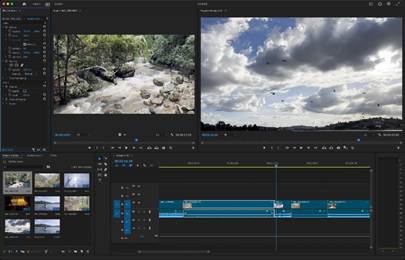

Course Name: Video Editing & Video Marketing Course
Duration: 2.5 Months (10 Weeks)
Classes: 5 Days per Week
Class Time: 1.5 – 2 Hours Daily
Level: Beginner to Professional
Fee: 20,000
🎯 Course Objective:
To train students in professional video editing, content creation, and video marketing so they can work in YouTube, social media marketing, advertising, and freelance video production.
Course Structure
Module 1: Introduction to Video Production (Week 1)
Topics
- Basics of video production
- Types of video content
- Video formats and resolutions
- Camera basics
- Storyboarding and script planning
Practical
- Plan a short video project
- Create basic storyboard
Module 2: Video Editing Fundamentals (Week 2)
Topics
- Introduction to video editing software
- Timeline editing
- Cutting and trimming clips
- Adding transitions
- Basic audio editing
Practical
- Edit short video clip
- Add transitions and background music
Module 3: Advanced Video Editing (Week 3-4)
Topics
- Multi-track editing
- Video effects
- Text and title animation
- Green screen editing
- Motion graphics basics
Practical
- Create promotional video
- Add titles and effects
Module 4: Color Correction & Audio Editing (Week 5)
Topics
- Color correction
- Color grading
- Audio enhancement
- Sound effects and voiceovers
Practical
- Improve video quality
- Add voiceover and sound effects
Module 5: Social Media Video Creation (Week 6)
Topics
- Short-form video editing
- Vertical video formats
- Reels and shorts creation
- Social media content strategy
Practical
- Create Instagram reels
- Create YouTube shorts
Module 6: YouTube Content Creation (Week 7)
Topics
- YouTube channel setup
- Video SEO basics
- Thumbnail design
- YouTube content strategy
- Monetization basics
Practical
- Create YouTube channel
- Upload optimized video
Module 7: Video Marketing (Week 8)
Topics
- Video marketing strategy
- Social media advertising
- Brand storytelling through video
- Video analytics
Practical
- Create video marketing campaign
Module 8: Freelancing & Portfolio (Week 9)
Topics
- Freelancing platforms
- Client communication
- Pricing video editing projects
- Building video portfolio
Practical
- Create portfolio video
- Upload projects online
Module 9: Final Project & Certification (Week 10)
Students complete a professional video project.
Example Project
- Promotional video
- Social media video campaign
- YouTube video series
- Marketing advertisement video
Evaluation
- Practical editing test
- Final video project
- Presentation
Software Covered
Students will learn popular tools such as:
- Professional video editing software
- Motion graphics tools
- Thumbnail and graphic tools
Career Opportunities
After completing this course students can work as: 🎬 Video Editor
📱 Social Media Video Creator
📢 Video Marketing Specialist
📺 YouTube Content Creator
💻 Freelance Video Editor
5. Tally with GST Course (Professional – 2.5 Months)
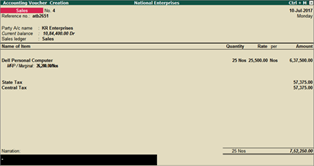

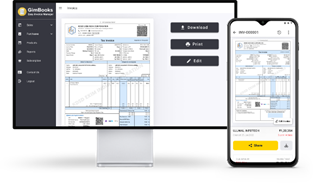
Course Name: Tally with GST Course
Duration: 2.5 Months (10 Weeks)
Classes: 5 Days per Week
Class Time: 1–1.5 Hours Daily
Level: Beginner to Professional
Fee: Rs.10,000
🎯 Course Objective:
To train students in practical accounting, GST billing, and financial record management using Tally so they can work as accounts assistants or Tally operators.
Course Structure
Module 1: Introduction to Accounting (Week 1)
Topics
- Basics of accounting
- Types of accounts
- Golden rules of accounting
- Debit and credit concepts
- Business transactions
Practical
- Identify debit and credit entries
- Basic accounting examples
Module 2: Introduction to Tally Software (Week 2)
Topics
- Introduction to Tally
- Tally interface
- Company creation
- Company features and configuration
- Company alteration and deletion
Practical
- Create company in Tally
- Configure accounting settings
Module 3: Ledger Creation (Week 3)
Topics
- Groups in Tally
- Ledger creation
- Ledger alteration and deletion
- Accounting groups
Practical
- Create ledgers for business accounts
Module 4: Voucher Entry (Week 4)
Topics
- Types of vouchers
- Payment voucher
- Receipt voucher
- Contra voucher
- Journal voucher
Practical
- Enter daily business transactions
Module 5: Inventory Management (Week 5)
Topics
- Stock groups
- Stock categories
- Units of measurement
- Stock items
- Inventory vouchers
Practical
- Create stock items
- Record purchase and sales
Module 6: GST Basics (Week 6)
Topics
- Introduction to GST
- Types of GST (CGST, SGST, IGST)
- GST registration basics
- GST terminology
Practical
- Understand GST structure
Module 7: GST Setup in Tally (Week 7)
Topics
- Enable GST in Tally
- GST ledgers
- GST tax rates
- GST configuration
Practical
- Set up GST in company
Module 8: GST Billing & Invoicing (Week 8)
Topics
- Purchase entry with GST
- Sales entry with GST
- GST invoices
- Input and output tax
- Credit and debit notes
Practical
- Create GST invoices
- Record purchase and sales entries
Module 9: GST Reports (Week 9)
Topics
- GST reports in Tally
- GSTR reports
- Tax summary
- Filing preparation basics
Practical
- Generate GST reports
Module 10: Final Project & Exam (Week 10)
Students complete a practical accounting project.
Example Project
- Create company
- Create ledger and stock items
- Record business transactions
- Generate GST invoice
- View financial reports
Evaluation
- Practical exam
- Project submission
- Viva
Reports Students Will Learn
Students will generate:
- Profit & Loss Statement
- Balance Sheet
- GST Reports
- Purchase Register
- Sales Register
Career Opportunities
After completing this course students can work as:
💼 Tally Operator
💼 Accounts Assistant
💼 Billing Executive
💼 Junior Accountant
💼 GST Billing Executive